Setup
a) BD54 -> Declaration of logical systems
Prerequisite: logical systems must be declared on each client to define the distribution model, etc…
b) BD64 -> distribution model
Define a distribution model for each target system/client.

c) SM59 -> RFC destination
Define the RFC destinations to the target systems for the distribution of the configuration. The important point, is to make sure that the user assigned to the RFC has the correct authorizations for the classification/class creation and/or change.
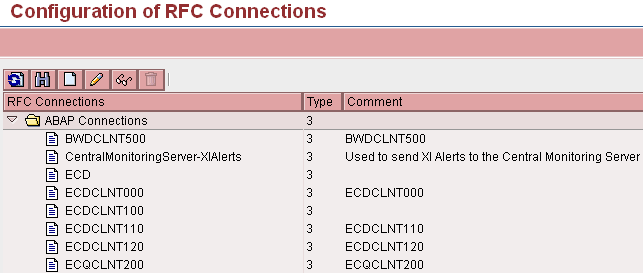
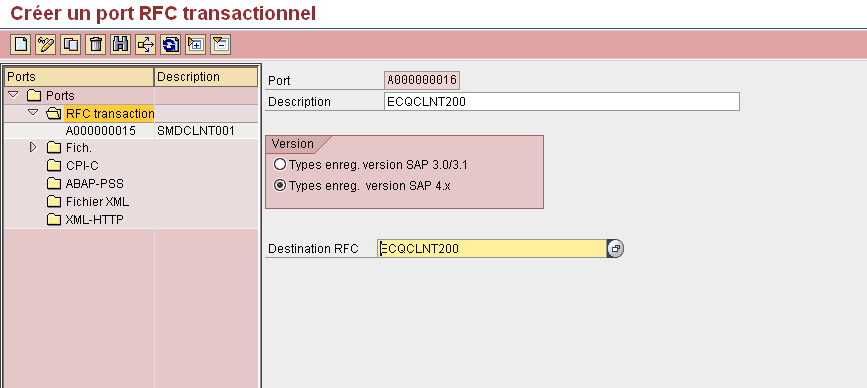
d) WE21-> Create transactional RFC port
Prerequisite: RFC connection configured (SM59) .
Ports identify the SAP systems for data exchange (Idocs, etc …).
e) BD82 -> Generate partner profile.
Prerequisite: transactional RFC port configured (WE21).
When the partner profile is set via BD82, it is not necessary to execute WE20 to define the outbound parameters. This has to performed from the source system, the partner system is the target system where the classification (release strategy) has to be transported.

Click execute and control the log

The systeme configures automatically the target port and the outbound parameters for the messages.
f) The next step is to define in the partner system (here ECQCLNT200), the inbound parameters for the processing of the messages sent by the source system (here ECDCLNT100). The configuration steps are for all the message types :

CHRMAS Characteristics :
Enter the number of partner ECDCLNT100
Enter the type of partner: LS
Enter the type of message: CHRMAS
Enter code processing message: CHRM
CLFMAS Classification:
Enter the number of partner ECDCLNT100
Enter the type of partner: LS
Enter the type of message: CLFMAS
Enter code processing message: CLFM
CLSMAS Characteristics values :
Enter the number of partner ECDCLNT100
Enter the type of partner: LS
Enter the type of message: CLSMAS
Enter code processing message: CLSM
Note : the inbound parameters have to be defined in each target system/client where the release strategy has to be transported.
Data Transport
All the systems/client are now ready, the distribution will copy the settings from the source system to the target systems.
The below transactions, have to be executed in the order shown (and numbered by SAP) characteristics, class, attributes.
BD91 => sending (CHRMAS)
BD92 => sending (CLSMAS)
BD93 => sending (CLFMAS)
Log into the target system(s) and check the IDOC processing with the transaction WE02 and/or execute BD87 to process the IDOCs.

No responses yet