Symptom
- Saved characteristic values are not updated in table AUSP.
- Wrong OBJEK value in AUSP.
- Table AUSP is updated but not INOB.
Environment
- SAP ERP Cross Application (CA)
- SAP R/3
- SAP R/3 Enterprise SAP ERP
- SAP ERP Central Component
- SAP R/3 Enterprise
- SAP Enhancement package for SAP ERP
- SAP Enhancement package for SAP ERP, version for SAP HANA
Reproducing the Issue
1. Classify an object of class type 023 and save

2. Use transaction SE16 and execute for the table AUSP.
3. insert the Object, Internal characteristc and Class type and execute
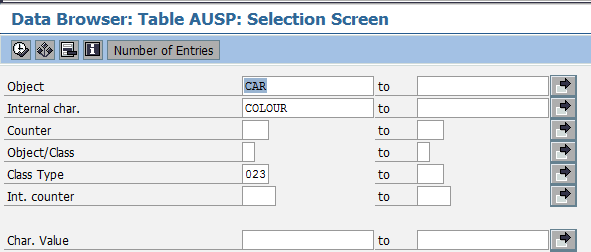
4. information message “no table entries found for specified key”

Cause
- In Transaction O1CL for the respective class type , The flag
“MULTOBJ (Multiple Objects Allowed)” is set / not set
Resolution
There are two different ways the system can identify objects (materials
purchase orders, etc) in classification depending on the flag MULTOBJ
(Multiple Objects Allowed) in transaction O1CL.
A) Flag MULTOBJ (Multiple Objects Allowed) not set.
- If in customizing (TA O1CL) for the respective class type
the flag MULTOBJ (Multiple Objects Allowed) is not set, the object
is taken directly in Table AUSP.
B )Flag MULTOBJ (Multiple Objects Allowed) is set.
- If in customizing for the respective class type (023) the flag
MULTOBJ (Multiple Objects Allowed) is set, the object is identified
via Table INOB: INOB-OBJEK is the Object, CUOBJ is the internal
object number.
Please refer to the F1-Help of the MULTOBJ Flag for more information
on this setting.
Example of how to lookup the table AUSP if the flag MULTOBJ is set .
- In the case of the example object Car, when using SE16 to look up the values saved for the Object ( field OBJEK ) in AUSP , no entries are found.
- As the flag MULTOBJ is set for the class type 023 , The table INOB is first updated with the object and is assigned an “internal object number” (INOB-CUOBJ).
- If you take this “internal object number” value saved ( INOB-CUOBJ ) and use it to look up the table AUSP under the Object field ( OBJEK ) , then the characteristic
values saved for the object should appear.
Keywords
AUSP , INOB , CUOBJ , OBJEK , TCLA , 01CL , ATINN , “Multiple Objects allowed” , MULTOBJ, SPRO , SDN , CABN , “internal object number”
No responses yet